Need more help?
Use the Help chat below on this page, or click here to submit a case to our Support Team.
Your CONNECT account
What is CONNECT?
CONNECT is Wiley’s solution for login and account access.
Use CONNECT to access Wiley Authors
To access Wiley Authors, you’ll need a CONNECT account. If you already have a CONNECT account from another Wiley service, simply use the same login credentials.
How do I register for a CONNECT account?
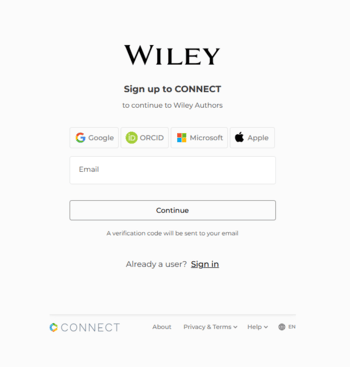
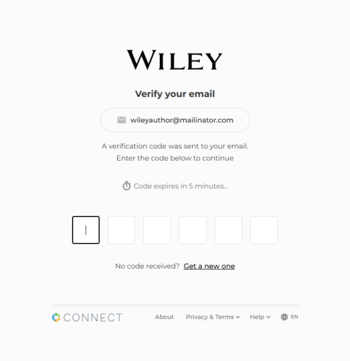
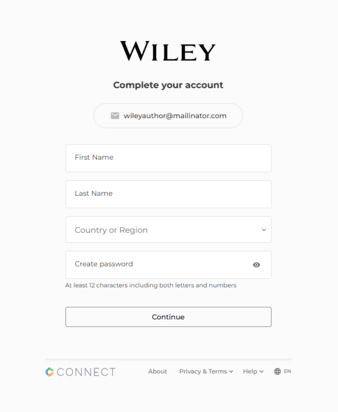
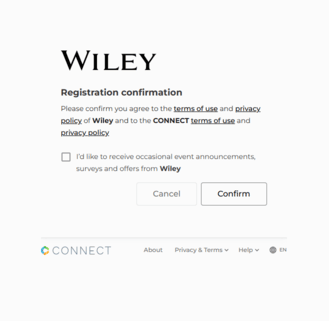
To register, follow these steps:
- Visit Wiley Authors and click "Log in / Register" in the top-right corner.
- Enter your email address. We strongly recommend you use the correspondence email address associated with your article when registering (this helps us link your article to your account).
- Check your email for a 6-digit verification code and enter it on the registration page. If you don’t receive it, click "Get a new one" to resend. Remember, codes are valid for 5 minutes.
- Fill out your personal details (name and country) and create a password.
- Review and accept the terms and conditions to complete registration. You can also opt into marketing communications from Wiley.
- Once registered, you'll be directed to your author dashboard, where you can access your articles.
How do I log into Wiley Authors using CONNECT?
To log in, click “Log in / Register” in the top-right corner of the Wiley Authors website. Enter your registered email and password. For faster login in the future, save a passkey.
How to manage your CONNECT account
To manage your account details, follow these steps:
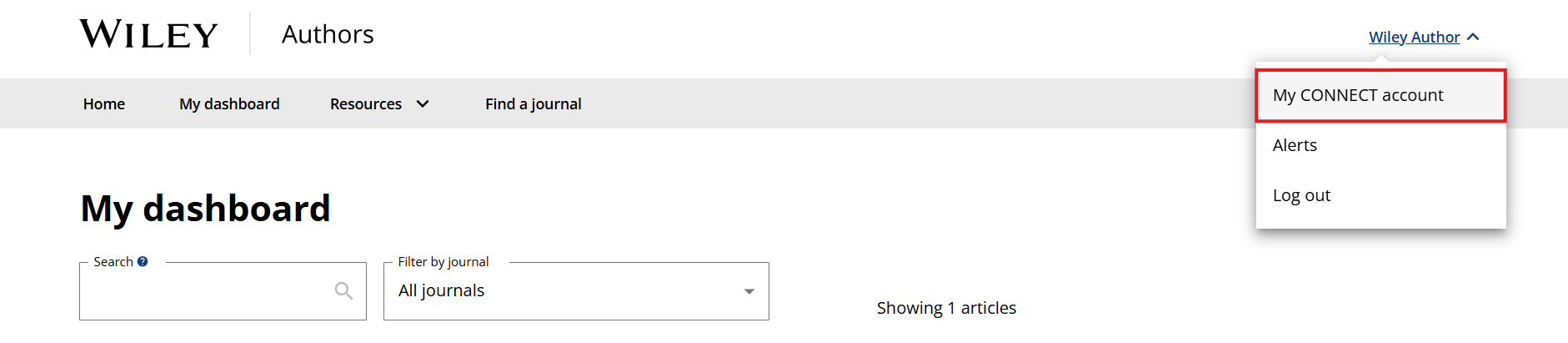
- Log in to Wiley Authors and click your name in the top-right corner.
- Select “My CONNECT Account” from the dropdown menu.
- You will be redirected to your CONNECT profile page, where you can:
- Update your primary email address
- Connect your ORCID ID
- Edit your name or location
- Change your password
Locked out of your account?
If you’re locked out, here’s how to reset your password:
- Visit Wiley Authors and click "Log in / Register" in the top-right corner.
- Enter your registered email.
- On the password screen, click "Forgot password? Get a verification code."
- Check your inbox for the code, which will allow you to reset your password. If you don’t see it, check your spam folder.
Where can I find additional support for CONNECT?
Further assistance is available on the CONNECT support page.
Using an ORCID iD
What is an ORCID iD, and why should I use it?
An ORCID iD is a unique, persistent identifier that distinguishes you from other researchers. It links you to your work, ensuring you get proper credit.
How do I manage my ORCID iD?
You can connect or unlink your ORCID iD to your Wiley Authors account in several ways:
- When logging into Wiley Authors.
- If you are a co-author and receive an email invitation to connect your ORCID iD.
- From the My ORCID iD page.
- During submission or revision, in the Author Details submission step, if you are submitting to a journal that collects author ORCID information.
Note: You can connect your ORCID iD in the Author Details submission step only if you are one of the authors of the manuscript.
The important things to know are that:
- Wiley Authors accounts are powered by the CONNECT login system.
- Your ORCID iD is associated with your Wiley Authors / CONNECT account overall, and not, for example, a single submission.
- You can connect your ORCID iD with a single Wiley Authors / CONNECT account at a time.
Connecting or unlinking your ORCID iD to or from your Wiley Authors account means that you are also doing this for your CONNECT account. So, if you use CONNECT with multiple publishers' submission systems, your ORCID iD will be added to or removed from those systems as well.
Can I connect an ORCID iD for my co-authors?
No, because the ORCID iD is connected at the account level and each author is responsible for verifying their own iD. This means that if you are the submitting author, you cannot connect an ORCID iD on behalf of your co-authors. Instead, co-authors can directly connect their own iD in multiple ways: by following the email notification, accessing the submission from their dashboard, or directly in their CONNECT account profile.
Don't see what you're looking for?
Use the Help chat on this page, or click here to contact Customer Support