Need more help?
Use the Help chat below on this page, or click here to submit a case to our Support Team.
Wiley Authors
What is Wiley Authors?
Wiley Authors is your one-stop hub for publishing in a Wiley journal. You can quickly find relevant information on your dashboard and act on all your articles, from submission through to publication.
From your dashboard, you can:
- Track an article’s progress through peer review and production
- Upload revisions and updated files
- Manage your email alerts
- Sign a license agreement
- Order and pay for open access
- Monitor the impact of your published articles
- And more!
Wiley Authors also offers support resources for journal authors and reviewers.
How do I find my Wiley Authors dashboard?
The quickest way is to navigate directly to your dashboard and bookmark the page for future use.
Alternatively, follow these steps to find your dashboard:
- Visit Wiley Authors and click "Log in / Register" in the top-right corner.
- Log in or register through CONNECT.
- After successful login or registration, you will be redirected to your dashboard.
When will I visit Wiley Authors?
You may find yourself using Wiley Authors in the following ways during the publishing process:
- Manuscript Submission: Access Wiley Authors for the first time when submitting your manuscript for journal consideration.
- Production Process: Visit during the production phase to complete post-acceptance tasks like license signing, reviewing proofs, and making open access payments.
- Email Invitations: Receive an email from Wiley Authors inviting you to register or log in, especially if you need to enter at later stages.
- Regular Visits: Use the dashboard regularly throughout the publishing process to stay updated and manage your tasks efficiently.
We recommend registering as soon as you receive the invitation email for the best experience.
I’m an author. Where do I go to find my submissions or articles?
You can find all your articles, from draft submission through to publication, in your Wiley Authors dashboard. We recommend bookmarking the page for future use.
Alternatively, follow these steps to find your dashboard:
- Visit Wiley Authors and click "Log in / Register" in the top-right corner.
- Log in or register through CONNECT.
- After successful login or registration, you will be redirected to your dashboard.
How are articles linked to my dashboard? What if I have multiple Wiley Authors accounts?
We use the correspondence email address provided during manuscript submission to link your article to your account. For this reason, we strongly recommend using the same email when registering for Wiley Authors.
If your article is registered under an email that differs from your existing account or if you have multiple Wiley Authors accounts, contact Customer Support for help.
What if I am publishing in a journal that doesn’t use Wiley Authors?
Most, but not all, journals published by Wiley use Wiley Authors. If your article is published by a journal that does not use Wiley Authors, you will receive separate instructions from the journal editorial office or production editor for tracking and managing your article.
How do I get help using Wiley Authors?
To get help using Wiley Authors, try the following:
- Use our live “Help” chat, available 24 hours a day / 7 days a week
- Or contact Customer Support
How do I check the status of my article?
To check the status of your article, follow these steps:
- Log into your Wiley Authors dashboard.
- Locate your article using the search and filter tools. You can search using your article title, journal title, Manuscript ID or DOI.
- The status will be displayed below your article title.
If you have questions about your article’s status, contact the journal’s editorial office.
What do I do if my article is missing from my dashboard?
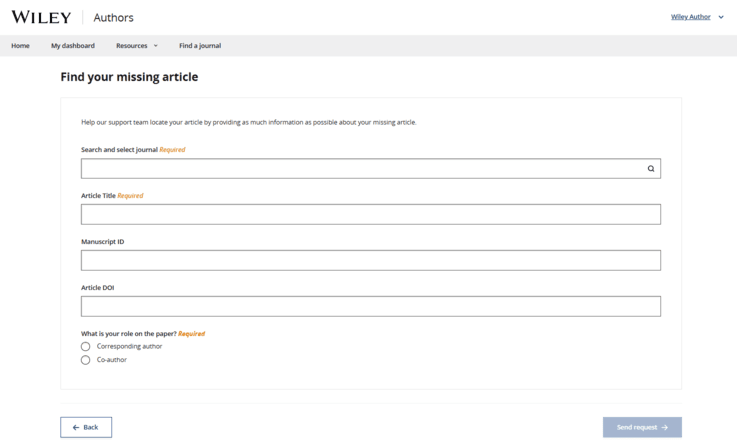
If you do not see an article that you expect to find in your Wiley Authors dashboard, use the following steps to manually assign it to your account. If manual assignment is not possible, the system will allow you to submit a help request to Customer Support.
- Log in to Wiley Authors.
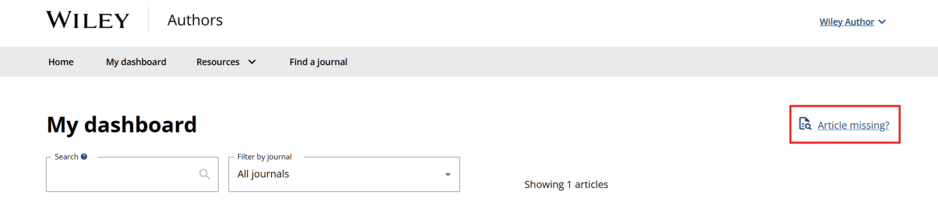
- On the right-hand side of “My dashboard,” select "Article missing?"
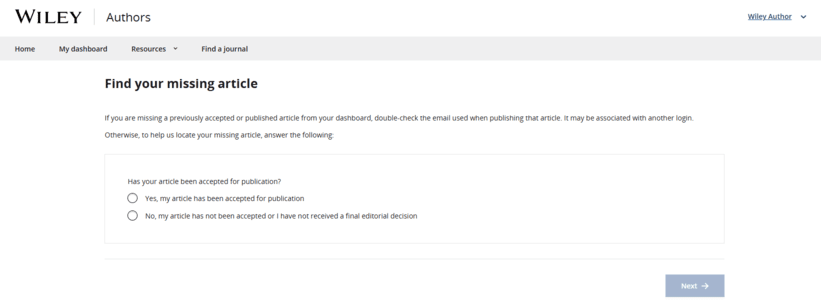
- You will be asked whether your article has been accepted for publication. Select “Yes” if your article has been accepted. Select “No” if your article was not accepted or you have not yet received a final editorial decision.
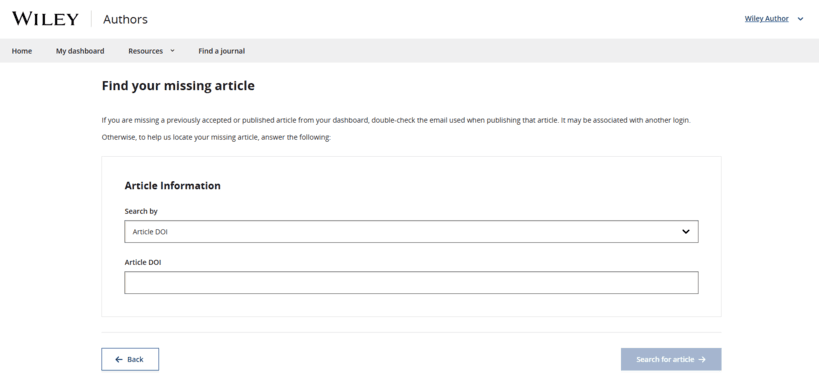
- If your article has been accepted, you can search for your article using two different search options: "Article DOI" and "Manuscript ID."
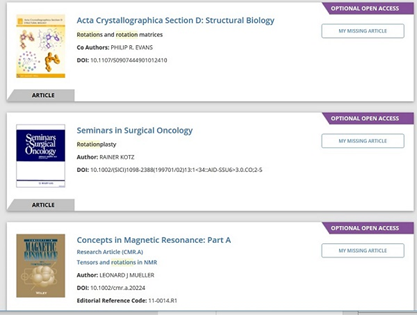
- In the Article Search Results list, select “My Missing Article” to add the missing article to your Wiley Authors dashboard.
- If your article has not been accepted or you cannot find your article using search, the system will allow you to submit a help request to Customer Support. They will follow up with you directly.
My article title is appearing incorrectly in Wiley Authors. How do I request an update?
If your article is still under review or you are preparing final files for an accepted article, email the journal editorial office. If your article has entered Wiley’s Production Process, use our live “Help” chat or contact Customer Support.
Don't see what you're looking for?
Use the Help chat on this page, or click here to contact Customer Support